Difference between revisions of "Features for Jewish cemeteries"
| (5 intermediate revisions by the same user not shown) | |||
| Line 2: | Line 2: | ||
[[Features for Jewish cemeteries#Yahrzeits|Yahrzeits]] | [[Features for Jewish cemeteries#Yahrzeits|Yahrzeits]] | ||
[[Features for Jewish cemeteries#Showing Yahrzeits in Burial Search|Showing Yahrzeits in Burial Search]] | |||
[[Features for Jewish cemeteries#Tracking Holocaust survivors|Tracking Holocaust survivors]] | [[Features for Jewish cemeteries#Tracking Holocaust survivors|Tracking Holocaust survivors]] | ||
| Line 8: | Line 10: | ||
==Hebrew calendar dates== | ==Hebrew calendar dates== | ||
[[File:Hebrew date in CIMS.png|thumb| | [[File:Hebrew date in CIMS.png|thumb|408x408px|Here the equivalent Hebrew date is displayed below the default Gregorian date.]] | ||
CIMS can display Hebrew dates alongside Gregorian calendar dates | CIMS can display Hebrew dates alongside Gregorian calendar dates. Hebrew dates will show for all of your users. | ||
These dates will display in a number of places throughout CIMS, including, but not limited to, the sold date of spaces, burial dates, birth dates, and so on. | These dates will display in a number of places throughout CIMS, including, but not limited to, the sold date of spaces, burial dates, birth dates, and so on. | ||
<span style="border:2px solid #c2dce9;padding:10px;border-radius:5px;background-color:#f2fbff;margin:15px 0px;display:inline-block;">To enable Hebrew dates for your cemetery, [https://www.cimscemeterysoftware.com/contact-us/ contact our team].</span> | |||
<div style="clear:both;"> | <div style="clear:both;"> | ||
| Line 18: | Line 22: | ||
==Yahrzeits== | ==Yahrzeits== | ||
[[File:Adding yahrzeit information to a customer record.png|thumb|407x407px|Add a death date to see upcoming Yahrzeits.]]We understand some cemeteries need to track Yahrzeits, and may need to specify if a death occurred before or after sunset so that the Yahrzeit is accurate. | [[File:Adding yahrzeit information to a customer record.png|thumb|407x407px|Add a death date to see upcoming Yahrzeits.]]We understand some cemeteries need to track Yahrzeits, and may need to specify if a death occurred before or after sunset so that the Yahrzeit is accurate. | ||
For those born in Adar in non-leap years, their Yahrzeit in a leap year will display as Adar I. If your synagogue recognizes Yahrzeits differently, [https://www.cimscemeterysoftware.com/contact-us/ contact our team]. | |||
<span style="border:2px solid #c2dce9;padding:10px;border-radius:5px;background-color:#f2fbff;margin:15px 0px;display:inline-block;">To view Yahrzeits, Hebrew dates need to be enabled for your cemetery.</span> | <span style="border:2px solid #c2dce9;padding:10px;border-radius:5px;background-color:#f2fbff;margin:15px 0px;display:inline-block;">To view Yahrzeits, Hebrew dates need to be enabled for your cemetery.</span> | ||
==== Add a Yahrzeit to a customer ==== | ==== Add a Yahrzeit to a customer==== | ||
To add a Yahrzeit to CIMS, open the buried person's customer record and add a death date and, optionally, specify if the death occurred before or after sunset. Click "update" to save your changes. The individual's Yahrzeit is now displayed both in their customer record and in the "Burial" tab of the right-hand flyout. Click the black triangle to see the next 5 Yahrzeits. | To add a Yahrzeit to CIMS, open the buried person's customer record and add a death date and, optionally, specify if the death occurred before or after sunset. Click "update" to save your changes. The individual's Yahrzeit is now displayed both in their customer record and in the "Burial" tab of the right-hand flyout. Click the black triangle to see the next 5 Yahrzeits. | ||
Forget how to find customer records? See [[Customers]] if Platinum, [[Customers (Gold & Light)]] if Gold or Light. | Forget how to find customer records? See [[Customers]] if Platinum, [[Customers (Gold & Light)]] if Gold or Light. | ||
==== Upcoming Yahrzeits report ==== | ====Upcoming Yahrzeits report==== | ||
You can use the "Upcoming Yahrzeits" report in the "Reports" tab of the left-hand flyout to generate a list of upcoming Yahrzeits. | You can use the "Upcoming Yahrzeits" report in the "Reports" tab of the left-hand flyout to generate a list of upcoming Yahrzeits. | ||
<br> | <br> | ||
<gallery widths="430" heights="280"> | |||
File:Upcoming yahrzeits in CIMS.png|Click the black triangle next to a burial's Yahrzeit to see the next 5 dates. | File:Upcoming yahrzeits in CIMS.png|Click the black triangle next to a burial's Yahrzeit to see the next 5 dates. | ||
File:Yahrzeits report.png|A report is available to view a list of upcoming Yahrzeits. | File:Yahrzeits report.png|A report is available to view a list of upcoming Yahrzeits. | ||
</gallery | </gallery> | ||
<br><br> | |||
<div style="clear:both;"></div> | |||
==Showing Yahrzeits in Burial Search== | |||
[[File:Burial Search with Hebrew date of death & Yahrzeits.png|458x458px|thumb|This cemetery chose to show the Hebrew date of death as well as the next 5 future Yahrzeits.]]Burial Search is able to show the Hebrew date of death as well as upcoming Yahrzeits. See [[Burial Search settings#Hebrew date of death & upcoming Yahrzeits|Hebrew date of death & upcoming Yahrzeits]]. | |||
<br><br> | |||
<div style="clear:both;"></div> | |||
==Tracking Holocaust survivors== | ==Tracking Holocaust survivors== | ||
| Line 45: | Line 55: | ||
*First, add a custom input to your cemetery labelled "Holocaust survivor" with a type of "dropdown" and just one option, "Yes". | *First, add a custom input to your cemetery labelled "Holocaust survivor" with a type of "dropdown" and just one option, "Yes". | ||
** See [[Advanced_cemetery_options#Custom_inputs_(aka_user-defined_fields)|Advanced cemetery options - Custom inputs]]. | **See [[Advanced_cemetery_options#Custom_inputs_(aka_user-defined_fields)|Advanced cemetery options - Custom inputs]]. | ||
*Then, edit customer records so that the "Holocaust survivor" field has a value of "Yes". | * Then, edit customer records so that the "Holocaust survivor" field has a value of "Yes". | ||
** See [[Customers]] if Platinum, [[Customers (Gold & Light)]] if Gold or Light. | **See [[Customers]] if Platinum, [[Customers (Gold & Light)]] if Gold or Light. | ||
*You will then be able to search for customers who are Holocaust survivors. | *You will then be able to search for customers who are Holocaust survivors. | ||
** See [[Searching#The_most_useful_search:_Customer_searches|Searching]] if Platinum, [[Searching_(Gold_%26_Light)#The_most_useful_search:_Customer_searches|Searching (Gold & Light)]] if Gold or Light. | ** See [[Searching#The_most_useful_search:_Customer_searches|Searching]] if Platinum, [[Searching_(Gold_%26_Light)#The_most_useful_search:_Customer_searches|Searching (Gold & Light)]] if Gold or Light. | ||
Latest revision as of 03:33, 4 March 2026
Showing Yahrzeits in Burial Search
Hebrew calendar dates

CIMS can display Hebrew dates alongside Gregorian calendar dates. Hebrew dates will show for all of your users.
These dates will display in a number of places throughout CIMS, including, but not limited to, the sold date of spaces, burial dates, birth dates, and so on.
To enable Hebrew dates for your cemetery, contact our team.
Yahrzeits
We understand some cemeteries need to track Yahrzeits, and may need to specify if a death occurred before or after sunset so that the Yahrzeit is accurate.
For those born in Adar in non-leap years, their Yahrzeit in a leap year will display as Adar I. If your synagogue recognizes Yahrzeits differently, contact our team.
To view Yahrzeits, Hebrew dates need to be enabled for your cemetery.
Add a Yahrzeit to a customer
To add a Yahrzeit to CIMS, open the buried person's customer record and add a death date and, optionally, specify if the death occurred before or after sunset. Click "update" to save your changes. The individual's Yahrzeit is now displayed both in their customer record and in the "Burial" tab of the right-hand flyout. Click the black triangle to see the next 5 Yahrzeits.
Forget how to find customer records? See Customers if Platinum, Customers (Gold & Light) if Gold or Light.
Upcoming Yahrzeits report
You can use the "Upcoming Yahrzeits" report in the "Reports" tab of the left-hand flyout to generate a list of upcoming Yahrzeits.
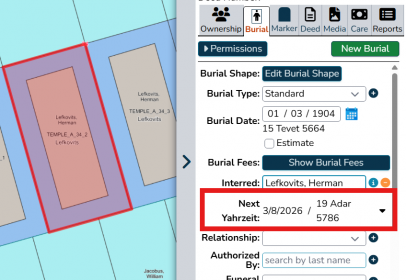
Click the black triangle next to a burial's Yahrzeit to see the next 5 dates.
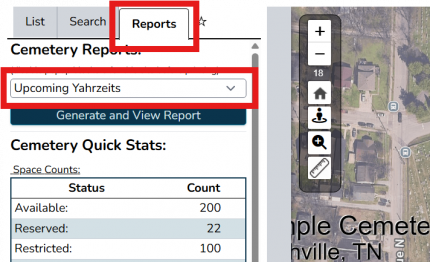
A report is available to view a list of upcoming Yahrzeits.


Showing Yahrzeits in Burial Search
Burial Search is able to show the Hebrew date of death as well as upcoming Yahrzeits. See Hebrew date of death & upcoming Yahrzeits.
Tracking Holocaust survivors
To track Holocaust survivors, we recommend the following:
- First, add a custom input to your cemetery labelled "Holocaust survivor" with a type of "dropdown" and just one option, "Yes".
- Then, edit customer records so that the "Holocaust survivor" field has a value of "Yes".
- See Customers if Platinum, Customers (Gold & Light) if Gold or Light.
- You will then be able to search for customers who are Holocaust survivors.
- See Searching if Platinum, Searching (Gold & Light) if Gold or Light.
- If Platinum, you can choose to visually distinguish Holocaust survivor burials by adding a map feature or flagging the burial object.
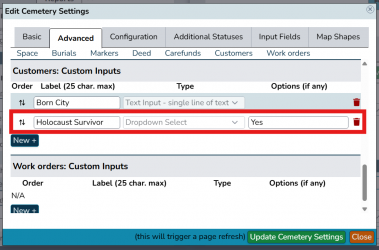
First, add a custom input for Holocaust survivors.
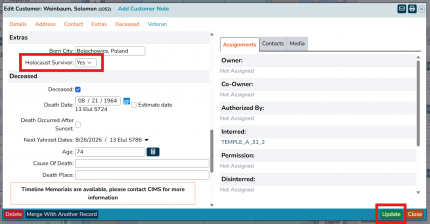
Next, mark customers as appropriate. Remember to click "update".
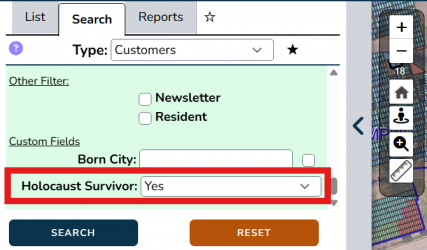
Now you can run a search for Holocaust survivors.


