Deeds
What is a deed
We understand most cemeteries don't issue deeds, they issue rights of burial. For the purposes of brevity, CIMS documentation will use the term "deed".
Create a deed when one or multiple spaces has been purchased as recognition of the sale; once created, you can generate a deed document directly from CIMS or upload media, such as an image of a deed originally recorded on paper or in a log book, to the deed.
Create a deed
To create a deed for one or more spaces, the spaces will first need to be sold. See the page Selling spaces & more.
- Navigate to one of the spaces you want to create the deed for, either by clicking on it on the map or loading its information in the right-hand flyout another way. Click the Deed tab in the right-hand flyout.
- The need type is a required field; all other fields are optional, though we recommend adding the deed date and purchase cost if you have that information. Click "Save".
- A popup will appear asking which spaces this deed applies to. You can pick one or multiple spaces simultaneously. Click "Save".
- Your deed has been created! If it is attached to multiple spaces, you will see those spaces listed.
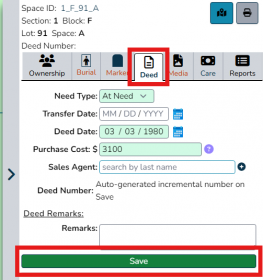
Select one of the spaces you want to add a deed to and click the Deed tab. Fill in the information for the deed and click "Save".
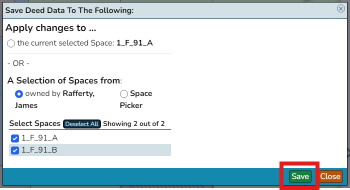
Choose which space or spaces to attach the deed to. In this case, we are attaching the deed to all spaces owned by the space's owner. Click "Save".
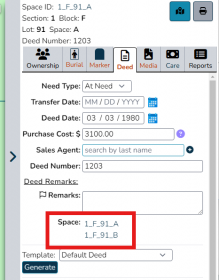
The saved deed will clearly display which spaces are attached to it.


Edit a deed
Coming soon!
Delete a deed
Coming soon!
Add media to a deed
Coming soon!