Difference between revisions of "What is Burial Search"
| Line 14: | Line 14: | ||
[[Using Burial Search]] | [[Using Burial Search]] | ||
<gallery widths=" | <gallery widths="350" heights="270"> | ||
File:Burial search burial overview.png|alt=Burial Search page displaying information about an individual burial, including location, individual details, associated images and a map of where the burial is located|Clicking on a burial will display more information about the individual | File:Burial search burial overview.png|alt=Burial Search page displaying information about an individual burial, including location, individual details, associated images and a map of where the burial is located|Clicking on a burial will display more information about the individual | ||
File:Burial Search veterans list.png|alt=Burial Search page showing a list of veterans and their locations in a cemetery, as well as a map with the burials highlighted|Clients may choose to display a list of veterans | File:Burial Search veterans list.png|alt=Burial Search page showing a list of veterans and their locations in a cemetery, as well as a map with the burials highlighted|Clients may choose to display a list of veterans | ||
File:Burial Search landing page.png|alt=Landing page for BurialSearch.com, introducing the service as a CIMS product and listing cemeteries available for public browsing|BurialSearch.com landing page | File:Burial Search landing page.png|alt=Landing page for BurialSearch.com, introducing the service as a CIMS product and listing cemeteries available for public browsing|BurialSearch.com landing page | ||
</gallery> | </gallery> | ||
Revision as of 15:05, 4 April 2025

Burial Search is an online grave locator linked to your CIMS database. Formerly called eCIMS, it is an interactive online database that shares cemetery data and maps with people seeking information about their loved ones or genealogists doing research.
Users can search for burials by names or locations, find burials on your cemetery map, and then print the information. You can visit our clients’ Burial Search sites by clicking this link.
This add-on to CIMS is available as a website for any of our Platinum, Gold or Light clients; cemeteries or city governments can make it available in their public spaces by using a kiosk or tablet, or using a QR code to help visitors find the site. Burial Search will free up time spent locating grave sites for visitors and family members and allow your staff to concentrate on other cemetery business.
Visit burialsearch.com!
See also
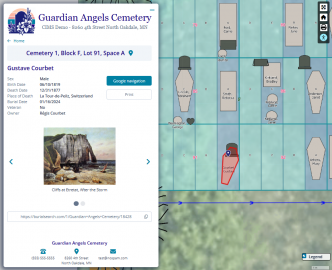
Clicking on a burial will display more information about the individual
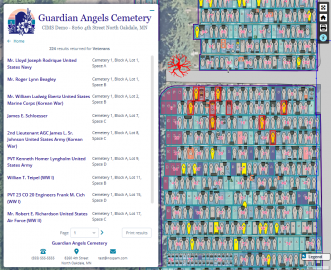
Clients may choose to display a list of veterans
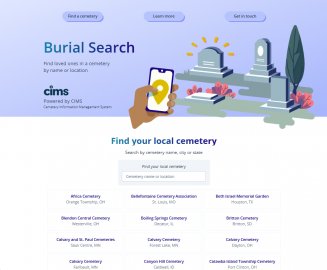
BurialSearch.com landing page


