Difference between revisions of "Using Burial Search"
| Line 75: | Line 75: | ||
==Available spaces== | ==Available spaces== | ||
When first navigating to a cemetery's Burial Search site, a section might be displayed titled "Considering our cemetery for your burial needs?"; this is a special preset search that will display a list of all of a cemetery's available spaces. | When first navigating to a cemetery's Burial Search site, a section might be displayed titled "Considering our cemetery for your burial needs?"; this is a special preset search that will display a list of all of a cemetery's available spaces. This feature is most useful for Platinum clients, whose visitors will be able to see available spaces displayed on their map. | ||
This feature is most useful for Platinum clients, whose visitors will be able to see available spaces displayed on their map. | |||
This section is optional, see the [[Burial Search settings#Preset searches|"Preset searches" section of "Burial Search settings".]]<gallery widths="300" heights="220"> | |||
File:Burial Search available spaces section.png|This optional section will allow visitors to see a list of all available spaces in a cemetery. | |||
File:Burial Search list of available spaces.png|Each page of results will show 10 available spaces, highlighted on the map (Platinum only). Showing the space type and space cost is optional. | |||
</gallery> | |||
| Line 84: | Line 86: | ||
==Veterans list== | ==Veterans list== | ||
When first navigating to a cemetery's Burial Search site, a section might be displayed titled "Looking for our veterans?"; this is a special preset search that will display a list of all of a cemetery's veterans. This feature is most useful for holidays like Memorial Day, when outside organizations may want to plant flags or otherwise honor veterans. | |||
<br><br> | This section is optional, see the [[Burial Search settings#Preset searches|"Preset searches" section of "Burial Search settings"]]. For information on the display of veteran names in the veterans preset search list, see the "Name display" section of the [[Burial Search settings#Burial information|"Burial information" section of "Burial Search settings"]].<gallery widths="300" heights="220"> | ||
File:Burial Search veterans list section.png|This optional section will allow visitors to easily see a list of all of a cemetery's veterans. | |||
File:Burial Search veterans list.png|10 veterans will display per page of search results, highlighted on the map (Platinum only). A veteran's branch/rank/war can be displayed with their name. | |||
</gallery><br><br> | |||
==Contact information== | ==Contact information== | ||
Revision as of 17:02, 28 October 2024
Finding your Burial Search site
Direct URLs for spaces & burials
Finding your Burial Search site
There are 3 ways to find your Burial Search site:
- Go to burialsearch.comand use the search feature to find your cemetery by name or location
- Use the full URL of your Burial Search site
- For our demo cemetery, this is https://burialsearch.com/1/Guardian+Angels+Cemetery. Your cemetery will have a similar pattern: burialsearch.com/###/Cemetery name
- Use the shortened URL of your Burial Search site
- For our demo cemetery, this is https://burialsearch.com/1. Your cemetery will have a similar pattern: burialsearch.com/###
Quick search
The quick search is at the top of a cemetery's Burial Search page, just underneath the header. Visitors can input a first, last or maiden name, then click "Search" to see a list of matches. Spelling needs to be accurate for all Burial Search searches.
Note: The quick search only matches the beginnings of names. Searching "will" will return results like "William" and "Williams", but not "Fitzwilliam" or "MacWillis".
Advanced search
The advanced search is at the top of a cemetery's Burial Search page, just underneath the header. Click on "See advanced search" to access it. Spelling needs to be accurate for all Burial Search searches.
The options that are available as advanced search filters match what CIMS administrators have chosen to display as burial information. See the "Burial information" section of "Burial Search settings" to change what information from CIMS is displayed to the public and thus searchable.
Unlike the quick search, the advanced search will search for matches within a name. Searching for "ma" will return results like "Mary" and "Mason" as well as "Thomas" and "Amanda".
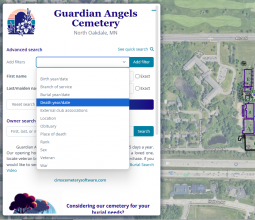
By clicking on "See advanced search", visitors can access the advanced search feature. By adding filters such as birth year, burial year and more, visitors can further refine search results.
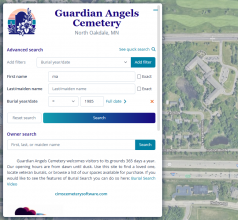
In this case, we are searching for a first name containing "ma" with a burial year of 1985.
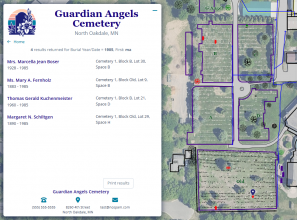
The results returned from this search include "Marcella" as well as "Thomas", as the advanced search will return names that match the search term at the beginning, middle or end of the name.


Owner search
Owner search allows for searching by owner or co-owner name. This feature is most useful for cemetarians wanting to reassure customers that they do have a record of their space purchase, and said purchase is viewable on a public website they can access themselves.
The owner search is at the top of a cemetery's Burial Search page, just underneath the header. Click on "See advanced search" to access it. Spelling needs to be accurate for all Burial Search searches.
To display the owner search, this option needs to be turned on in CIMS. See the "Search by owner" section of "Burial Search settings".
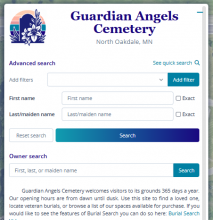
By clicking on "See advanced search", visitors to BurialSearch.com can access the "Owner search" option.
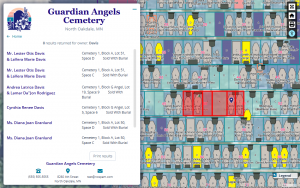
A list of relevant results will display; website visitors can navigate around the map to see where these owner spaces are located (Platinum only).


Available spaces
When first navigating to a cemetery's Burial Search site, a section might be displayed titled "Considering our cemetery for your burial needs?"; this is a special preset search that will display a list of all of a cemetery's available spaces. This feature is most useful for Platinum clients, whose visitors will be able to see available spaces displayed on their map.
This section is optional, see the "Preset searches" section of "Burial Search settings".

This optional section will allow visitors to see a list of all available spaces in a cemetery.
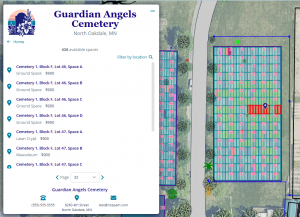
Each page of results will show 10 available spaces, highlighted on the map (Platinum only). Showing the space type and space cost is optional.


Veterans list
When first navigating to a cemetery's Burial Search site, a section might be displayed titled "Looking for our veterans?"; this is a special preset search that will display a list of all of a cemetery's veterans. This feature is most useful for holidays like Memorial Day, when outside organizations may want to plant flags or otherwise honor veterans.
This section is optional, see the "Preset searches" section of "Burial Search settings". For information on the display of veteran names in the veterans preset search list, see the "Name display" section of the "Burial information" section of "Burial Search settings".

This optional section will allow visitors to easily see a list of all of a cemetery's veterans.
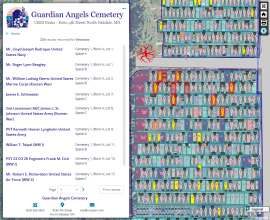
10 veterans will display per page of search results, highlighted on the map (Platinum only). A veteran's branch/rank/war can be displayed with their name.


Contact information
We highly recommend each cemetery include basic contact information, including the cemetery location and a contact phone number.
See the "Header & footer" section of "Burial Search settings".
Text here
Printing the map (Platinum & Gold only)
Text here
Accessibility controls
Text here
Text here
Walk-to-grave
Text here
Direct URLs for spaces & burials
Text here